Infrasound detector app: see the sound below 20 Hz
Wind, traffic, machinery and weather produce sound too low to hear. InfraSound Analyzer turns your microphone into a live window on it: free, in your browser, nothing uploaded.
What is infrasound?
Infrasound is sound below 20 hertz (Hz), under the lowest pitch most people can hear. It is everywhere: wind rolling over buildings, heavy traffic, heat pumps and furnaces, industrial fans, ocean surf, thunder, even your own heartbeat, which beats at roughly 1 to 1.5 Hz. You rarely hear it, but you can sometimes feel it as pressure, a throb, or a rattle in windows.
How an infrasound detector app works
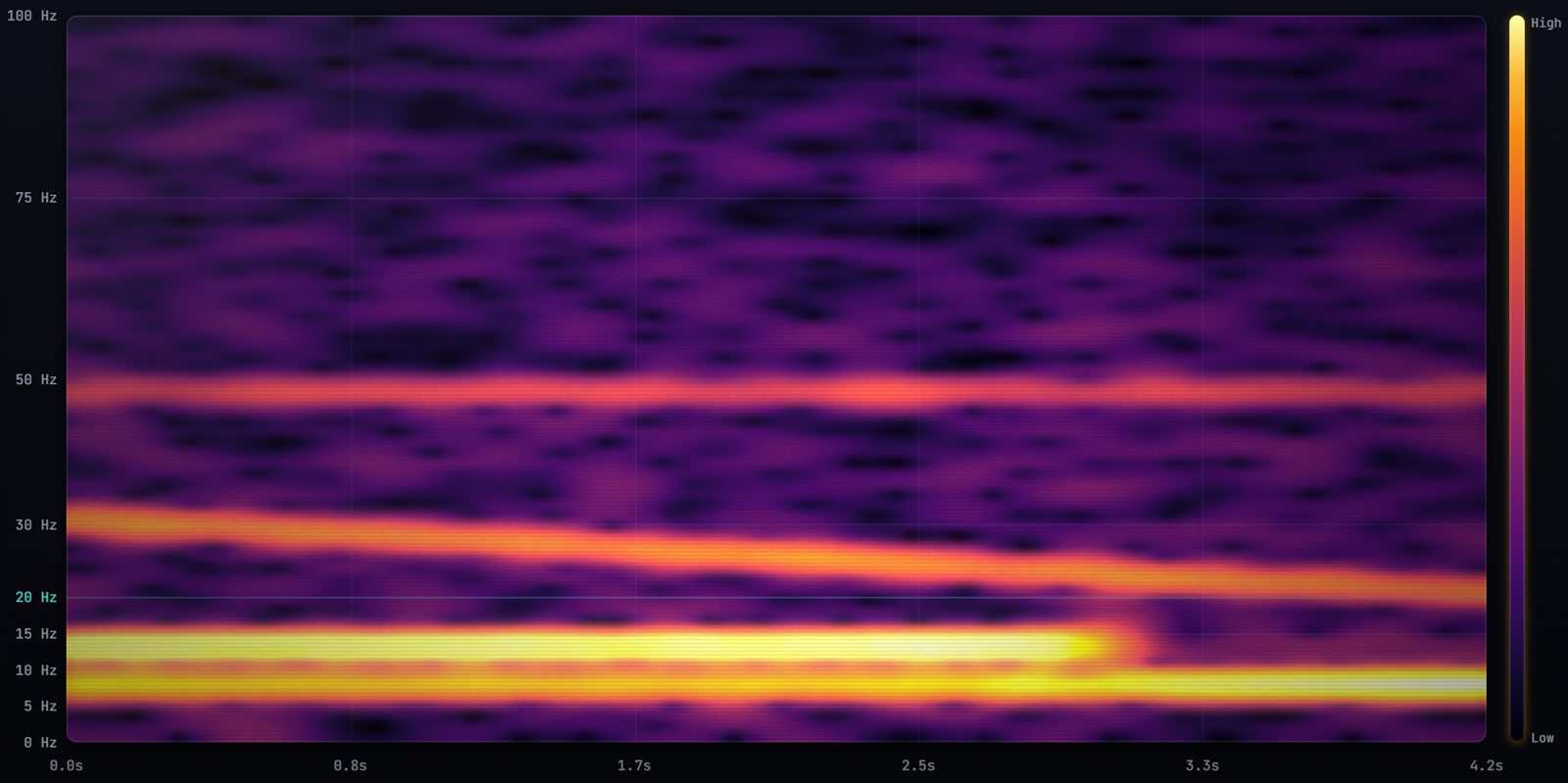
Your microphone turns air pressure into a signal. InfraSound Analyzer runs a high-resolution frequency analysis on that signal many times a second, then draws it as a live spectrogram: time runs left to right, frequency runs bottom to top, and loudness becomes colour. Anything below the 20 Hz line is infrasound.
- 1.46 Hz resolution by default, fine enough to separate a 7 Hz source from a 12 Hz one.
- Automatic event log: each real infrasound peak (1–20 Hz) is logged with time, frequency and level, and the app ignores false peaks that a filter edge can create.
- Band levels every second for infrasound (1–20 Hz) and low sound (20–95 Hz), so even a quiet recording gives you data.
- Everything stays on your device. Nothing is uploaded.
Detect infrasound in 4 steps
- Open InfraSound Analyzer on a phone, tablet or computer. There's nothing to install.
- Press Demo first. It plays a known 7.3 Hz and 12.5 Hz signal through the analyzer, so you can see exactly what infrasound looks like on screen.
- Press record and allow microphone access. Keep the device still and away from wind.
- Watch below the teal 20 Hz line. Steady horizontal bands are continuous sources (machinery, a heat pump); short bright bursts are events (a door slam, a passing truck).
Can a phone really detect infrasound?
Partly, and honesty matters here. Most phone and laptop microphones are designed for speech and roll off steeply below about 20 Hz, so very low infrasound is heavily reduced before the app ever sees it. InfraSound Analyzer switches off the browser's echo cancellation, noise suppression and automatic gain, which otherwise remove low sounds. That gets you the most your built-in mic can give. For serious work, add a measurement microphone:
| Level | Microphone | Why |
|---|---|---|
| Starter | Dayton Audio iMM-6 / iMM-6C | Plugs into a phone, affordable, far flatter low end than a built-in mic. |
| Recommended | miniDSP UMIK-1 or Dayton UMM-6 | USB measurement mics with calibration files; the standard for low-frequency work. |
| Professional | Roga infrasound USB mic | Rated down to 0.2 Hz for true infrasound capture. |
See the microphone guide for links.
Who uses it
Homeowners and tenants tracking a hum or throb, neighbours of wind turbines and industry documenting a problem, HVAC technicians and inspectors finding low-frequency vibration, teachers and students exploring sound, and curious people chasing the famous "19 Hz ghost frequency". With Pro you can export WAV audio and CSV/JSON data, and create a one-click PDF report with charts and events for a landlord, council or engineer.
Questions people ask
Is there a free infrasound detector app?
Yes. InfraSound Analyzer is free to use in any modern browser on Windows, macOS, Android and iPhone, with a live spectrogram, event log and recording library. Pro ($9.99 one-time) adds the 3D view, PDF reports and exports.
What frequency is infrasound?
Infrasound is sound below 20 Hz. Human hearing typically spans about 20 Hz to 20,000 Hz, although very loud infrasound can sometimes be felt as pressure or vibration.
Why doesn't my phone show much infrasound?
Built-in microphones are tuned for voice and lose sensitivity below about 20 Hz. The app disables the audio processing that hides low sounds, but a measurement microphone such as the Dayton iMM-6 or miniDSP UMIK-1 captures much more.
Are the levels calibrated?
No. Levels are relative dB, which is ideal for comparing times, places and sources. For legal-grade sound pressure measurements, use a calibrated sound level meter.
Does the app upload my recordings?
No. All analysis and storage happen on your device. Nothing is sent to a server.